Start with a style
Choose a caption preset, then tune the font, size, colour, outline and placement to suit your footage.
Auto caption generator · PowerCut AI
Generate and style video captions with PowerCut AI. Give your Shorts, Reels and podcast clips readable text that fits your voice and visual identity.
Free plan available. Features and usage limits vary by plan.
An auto caption generator turns the speech in your video into timed on-screen text. PowerCut AI combines transcription with caption presets, typography controls and word emphasis so you can build captions around your edit.
Made for the way creators work
Choose a caption preset, then tune the font, size, colour, outline and placement to suit your footage.
Highlight the words that carry the point. Keep the message readable without making every word compete for attention.
Position your text around the speaker and other visual layers. Readability warnings help you spot issues before export.
From idea to finished clip
Process your source video to create its transcript and timed captions.
Open Captions, choose a preset and adjust typography and emphasis.
Check names, timing and line breaks, then save and inspect the exported MP4.
Inside PowerCut AI
Choose a style on the left, then refine the typography on the right. Adjust font size, letter spacing and colour to make your captions fit the footage.
Explore caption controls ↗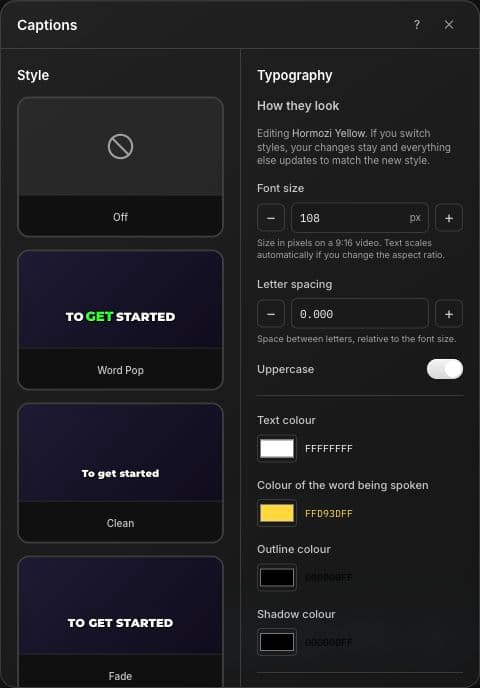
A few useful answers
Yes. You can choose a preset and adjust typography, colours, outline and position. Review the transcript for names and specialised vocabulary.
These captions follow the speech transcribed from your source. This page describes automatic captions, not automatic translation or dubbing.
Caption previews can differ slightly from the rendered video. Inspect your exported MP4 before publishing.
Keep creating

Turn spoken video into a timed transcript with PowerCut AI. Follow the conversation, select meaningful passages and move from words to an edit.
Explore feature
Save a reusable video brand kit in PowerCut AI. Apply your preferred styling across clips and add intro or outro cards for a consistent series.
Explore feature
Export saved clips as MP4 files with PowerCut AI. Prepare vertical, square, portrait or landscape videos for the channels where your audience watches.
Explore featureBring your recording to PowerCut AI. Find the moment, shape the edit and make it yours.
Start creating